
Zanodex.com Review Exploring Crypto Exchange Features and Trading Fees
In short
Zanodex.com review explores a trusted crypto exchange with thousands of user reviews, offering spot trading, futures, competitive fees, staking, and reliable support.
What Zanodex.com Offers
Zanodex.com structures its main page around trading sections for both spot and futures markets. The interface shows pairs such as BTC/USDT and ETH/USDT with their current prices and 24-hour volumes. Visitors see direct links to deposit, withdrawal, and wallet pages, plus a navigation item labeled “Trade.”
Access works through any standard web browser, and the layout adapts for mobile screens. The platform requires an email address and a verification link to open an account. Once inside, users can move between market tables, deposit forms, and futures listings without additional software downloads.
Spot markets display standard order books with price and size columns, while futures appear in separate tabs labeled “New Futures” and “Top Futures.” The site does not publish contract specifications, leverage caps, or funding-rate formulas, so traders must consult each contract page individually.
Additional sections include a referral link generator and occasional banners for vouchers or fee credits. These tools sit alongside the main trading area and do not require separate logins. Support is listed as a contact link that opens a form; no live-chat window or ticket numbers appear on the homepage.
Language options are limited to English on the visible pages. Users who speak other languages rely on browser translation tools. The platform stores basic profile information such as email, password, and two-factor authentication settings inside the account dashboard.
Overall, the site provides entry points for spot trading, futures exposure, and simple asset transfers. Traders can begin by registering, verifying an email, depositing funds, and selecting a market pair from the displayed tables.
Spot Trading and Order Types
Zanodex.com shows spot markets for the main pairs such as BTC/USDT and ETH/USDT, with tables that display current prices and 24-hour volumes. A trader can open the Trade section, choose a pair, and place a simple market order to buy or sell at the displayed price. For more control, the interface supports limit orders, allowing the user to set a specific price at which the trade should execute when the market reaches that level.
Users who want to adjust their holdings without constant monitoring can set a limit order slightly below the current price and wait for a dip. Once the order fills, the asset appears in the wallet balance, ready for further action or withdrawal. The same process works in reverse when selling: a trader places a limit sell order at a chosen target and the system executes it when a matching buyer appears.
Many traders combine these two order types in one session. They may start with a market buy to enter a position quickly, then place a limit sell order to lock in a planned profit level. This sequence keeps the workflow inside a single account view without switching to external charting tools.
- Check the 24-hour volume column to gauge how active each pair is before placing an order.
- Use a market order only when immediate execution is more important than the exact price.
- Set a limit order a few percent away from the current price to capture small swings without watching the screen.
- After an order fills, verify the updated balance in the wallet section before deciding on the next step.
- Keep a record of executed prices in a separate note so later trades can be compared against your targets.
Futures Trading Section
Users access futures contracts through the dedicated section on the homepage, which lists both new and top futures pairs. The interface displays contract names and 24-hour volumes, allowing traders to locate active markets quickly before opening positions.
Once a contract is selected, the order panel appears alongside the price chart and order book. Traders can review available liquidity and place orders without leaving the same screen, which reduces the number of clicks required to enter or exit a position.
Funding rates and margin requirements are not published on the open pages, so users typically open the trading terminal and review the contract details directly before committing capital. This step helps align leverage choices with individual risk limits and avoids unexpected liquidation thresholds.
Common use cases include hedging spot holdings during periods of high volatility and taking short-term directional views on price movements. A trader who already holds BTC in the spot wallet, for example, might open an opposite futures position to offset potential downside without selling the underlying asset.
Another scenario involves pairs trading: monitoring two correlated contracts and entering long-short positions when the spread widens beyond historical norms. The futures interface supports this approach by keeping multiple order books visible in separate tabs.
Order management tools allow simultaneous monitoring of open positions, unrealized profit and loss, and available margin. Adjusting position size or adding to an existing trade can be completed from the same panel, which keeps the workflow compact even when several contracts are active at once.
Fees and Maker Taker Structure
Zanodex.com presents its fee system in general terms rather than a detailed schedule. The platform mentions that users pay different rates depending on their trading role, yet no current maker or taker percentages, volume brackets, or minimum thresholds appear on the publicly accessible pages. Visitors must open an account and examine the fee table inside the dashboard to see the exact numbers that apply to their activity level.
The referral program is described as an additional way to reduce costs. Users receive a personal link that can generate ongoing rewards when invited participants trade, but the site does not publish the commission share percentage or the conditions required for payouts. Any rewards are credited to the referrer’s account balance, where they can be used for trading or withdrawn according to the platform’s withdrawal policy.
Occasional vouchers and trading bonuses are listed under promotions. These vouchers typically cover a portion of trading fees for a limited period, and the exact value and validity period are shown on the user’s profile once the campaign is active. Because the terms change, traders are advised to check the promotions section before each large trade.
Without published figures, it is difficult to place Zanodex fees beside those of other exchanges. Many established platforms publish a clear grid that starts at 0.1 percent for both maker and taker and then lowers the rate as monthly volume grows. Zanodex may follow a similar pattern, but users should confirm the current rates directly on the site before committing large positions.
- Log in and open the “Fees” or “Trading Fees” tab inside the account dashboard to view the live maker and taker percentages.
- Check the referral section for the current commission share rate and the minimum trading volume required for payouts.
- Review any active vouchers or bonus campaigns listed under “Promotions” before placing large orders, since the fee discount applies only during the stated period.
- Compare the displayed rates with your expected monthly volume to estimate the actual cost per trade.
- Keep records of fee deductions in the transaction history so you can verify that the published schedule matches the charges applied to your account.
Staking and Rewards
Zanodex.com presents staking as one of the platform’s yield tools, yet public pages contain no published annual percentage yields, lock-up schedules, or supported assets. Traders interested in passive income usually examine the dashboard after account creation to see which coins are currently offered and what holding periods apply.
The referral program works through unique invite links that participants share with new users. Once the referred trader completes the required verification steps and begins trading, the referrer becomes eligible for commissions on the new user’s fees. The exact percentage split and payout frequency appear only inside the logged-in account, so new affiliates review the terms in the referral section before sending links.
Platform marketing also mentions periodic vouchers and trading bonuses that can offset fees. These promotions are listed under a dedicated campaign tab, where eligible users can claim codes and track their remaining balance in the rewards ledger.
Before committing funds to staking or referral activity, users typically compare the displayed rates on Zanodex.com with historical payout data on independent forums and with the published terms of other exchanges. This cross-check helps confirm whether the quoted yields are current and whether withdrawal conditions match expectations.
Account statements inside the personal cabinet show accrued staking rewards and referral commissions in a single transaction list, allowing participants to monitor performance without switching between multiple tabs or external trackers.
Account Dashboard and Interface
The personal cabinet on Zanodex.com brings trading, wallet, and deposit functions into one place. Users move between market screens and balance views without leaving the same workspace, which reduces the number of clicks when checking positions or preparing transfers.
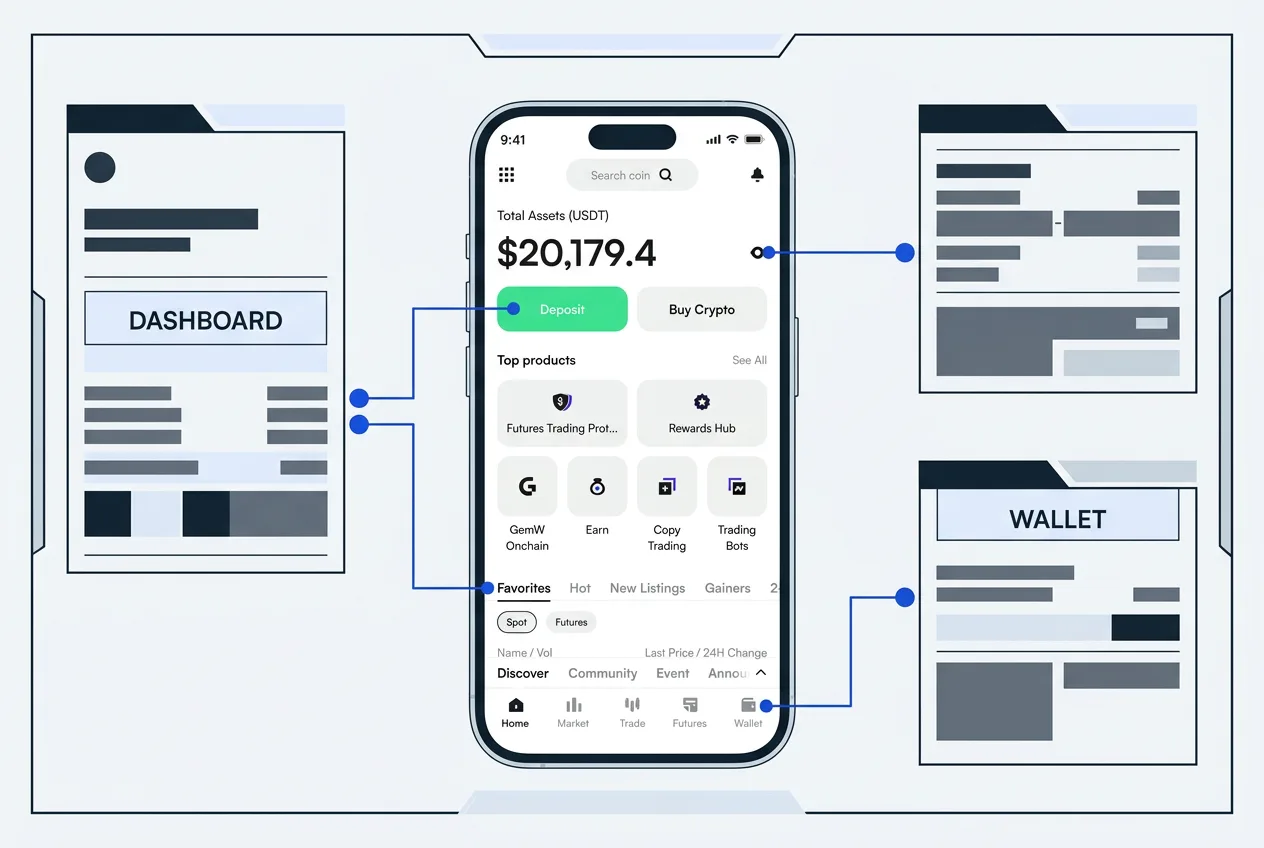
Profile settings cover standard security steps such as enabling two-factor authentication. The same area stores basic identity fields and activity logs, giving users a single spot to review recent logins or adjust access permissions.
Support sits one click away through the navigation menu. A help section lists short guides on deposits and order placement, while the support link opens a ticket form for specific questions. Response times are not published, so traders discover actual speed once they submit the first request.
Registration follows the usual sequence: email confirmation, password creation, and optional KYC upload. After verification, the dashboard displays live balances, open orders, and quick links to deposit methods.
- Check the security tab early and activate 2FA before funding the account.
- Use the wallet view to confirm deposit addresses and network selection before each transfer.
- Save the ticket reference number after contacting support so follow-up messages stay in one thread.
- Review the activity log weekly to spot any unfamiliar sessions quickly.
- Keep withdrawal addresses whitelisted if the platform offers that option for faster future transfers.
Market Data and Charts
Zanodex.com displays standard market tables on its homepage that list pairs such as BTC/USDT and ETH/USDT along with 24-hour volumes. Traders who open the “Trade” section see these numbers updated in real time and can quickly sort markets by price change or volume.
Basic price feeds support simple tasks: confirming a spot order before execution or checking overnight movement in a futures contract. For users who track several assets, the table view reduces the need to open separate windows or refresh external sites for quick reference.
Because no third-party charting package is listed in the public pages, traders who want candlestick patterns or indicators must rely on the built-in price line or move data to another service. The same limitation applies to order-book depth, which the homepage shows only in summary form.
Market participants who combine on-platform execution with outside research follow a straightforward sequence: copy the pair symbol, paste it into their preferred charting tool, then return to Zanodex.com to place the order. This workflow suits portfolio rebalancing or short-term entries where rapid price confirmation matters more than advanced overlays.
The displayed volumes give an immediate sense of liquidity for each pair. When the number next to BTC/USDT rises sharply, traders can adjust position size or timing without switching tabs. Those who need deeper historical datasets or custom studies continue to export CSV files or use external terminals until the platform adds further visual tools.
Comparison with Typical Platforms
Established exchanges publish detailed fee schedules, leverage ranges, and staking yields that users can review before committing funds. Zanodex.com presents its trading interface with spot and futures markets visible, yet the accessible pages contain less granular information on those parameters. Traders accustomed to comparing multiple venues therefore check the live site directly for current conditions.
Referral programs on established platforms often disclose revenue-share percentages and tiered payout rules. The Zanodex.com referral section mentions rewards for inviting friends, but exact commission rates or performance thresholds are not specified in the publicly viewable materials. Users evaluating affiliate options can review the referral link terms inside their account for the most recent details.
Market data presentation also differs across platforms. Many services integrate third-party charting packages with dozens of indicators and order-book depth tools. The Zanodex.com homepage displays standard price and 24-hour volume tables; traders who rely on advanced technical analysis can test whether additional charting functions appear once logged in.
- Compare the displayed spot pairs and 24-hour volumes against the pairs you trade most often.
- Review the futures section for any listed contract specifications before placing a leveraged order.
- Check the referral dashboard after registration to see exact reward percentages and payout conditions.
- Examine deposit and withdrawal options in the wallet area to match your preferred payment methods.
- Verify support response channels and language options through the help links in the navigation menu.
Security practices follow a familiar pattern: two-factor authentication is encouraged, and wallet functions are accessed through an authenticated session. Traders who prioritize extra verification layers can enable 2FA immediately after account creation and monitor withdrawal confirmations via email.
Practical Considerations
Before any account registration, examine the platform’s deposit and withdrawal procedures directly through the interface. Check supported currencies, network fees, and processing times in the wallet section to align expectations with actual operations.
After creating a profile, review security options such as two-factor authentication and withdrawal whitelisting. Enabling these features early limits exposure if login credentials are compromised.
Users who plan to trade contracts should open the futures interface first and note margin requirements, available leverage levels, and settlement rules. Comparing these values against positions already held on other exchanges avoids mismatched calculations during execution.
The referral link can be tested with a small test trade to verify commission accrual before sharing it with others. This step confirms payout timing and minimum thresholds listed in the program terms.
Support channels are accessed from the account menu; sending a trial query before funding reveals response speed and language coverage. Keeping records of these exchanges helps track any follow-up needed during later activity.
Finally, record all transaction IDs and export trade history regularly. This habit supports accurate portfolio tracking and simplifies tax reporting regardless of the trading volume.
Frequently asked questions
Does Zanodex.com list specific maker and taker fees?
Public pages do not display detailed maker and taker rates or volume tiers. Users need to review account terms after registration for current figures.
Are futures leverage levels published on Zanodex.com?
The site lists futures contracts but does not show leverage ranges or funding rates in accessible sections. Live account checks provide the latest parameters.
What staking yields does Zanodex.com advertise?
No specific staking yields or lock periods appear in public materials. Actual returns require verification inside the platform after deposits.
How does the Zanodex.com referral program work?
The platform mentions invite links for rewards, yet exact commission rates and payout conditions remain unspecified on the homepage. Account review clarifies terms.
Is support available in multiple languages on Zanodex.com?
Language options are not listed publicly. Support access occurs through a navigation link with guides, and users can test multilingual capabilities after login.
TrustScope
Comments 10